Configuring MetaMask for Zero Fees
One of the unique features of Stability is zero-fee transactions. This guide shows you how to configure MetaMask to take advantage of this.
Understanding Zero Fees on Stability
Stability requires that the Max Base Fee and Max Priority Fee be set to zero. This is different from traditional Ethereum chains where gas fees are required.
Configuring MetaMask
For MetaMask Users
When making your first transaction, you will need to manually set the gas fees to zero. It is recommended to save these values as your default settings.
Step 1 - Prepare Your Smart Contract
Before initiating a transaction, navigate to a Web3 IDE of your choice, such as Remix. Compile the following example contract:
// SPDX-License-Identifier: MIT
// Compatible with OpenZeppelin Contracts ^5.0.0
pragma solidity ^0.8.20;

import "@openzeppelin/contracts/token/ERC20/ERC20.sol";

contract PossumToken is ERC20 {
    constructor() ERC20("PossumToken", "POSSUM") {
        _mint(msg.sender, 10000 * 10 ** decimals());
    }
}
Note: Ensure you're using the correct Solidity and EVM compiler version.
Step 2 - Initiate a Transaction
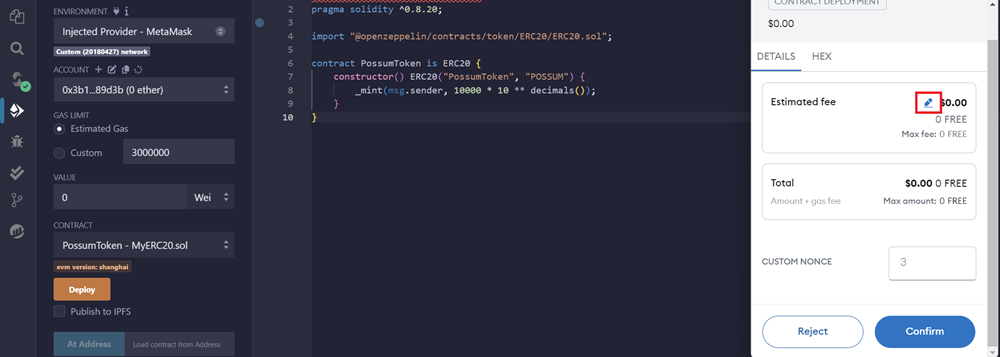
When a MetaMask popup appears to confirm a transaction, click the pencil icon in the estimated fee box.
Step 3 - Set Gas Values to Zero
Click the advanced gas fee icon. This will allow you to customize MetaMask for zero gas transactions.
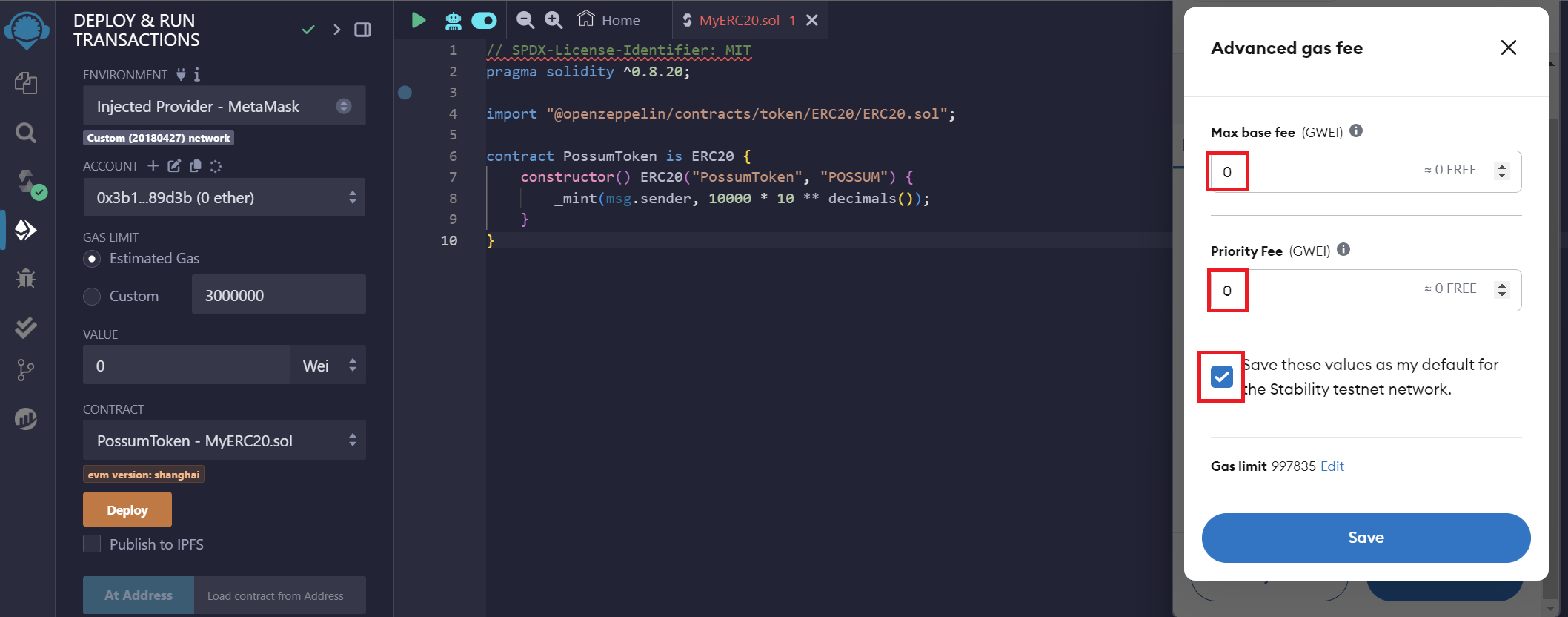
Set your Max Base Fee and Priority Fee to zero.
Step 4 - Save as Default
Click the Save these values as my default... checkbox to avoid having to manually set the gas in the future.
For Developers: Coding Zero Fees
When using libraries such as ethers or viem, you must explicitly set gas fees to zero in your code.
- ethers.js v6
- ethers.js v5
const tx = {
    ...
    maxFeePerGas: 0n,
    maxPriorityFeePerGas: 0n
};
const tx = {
    ...
    gasPrice: ethers.utils.parseUnits("0", "gwei"),
    maxPriorityFeePerGas: ethers.utils.parseUnits("0", "gwei"),
};
A live example of these values being explicitly set to zero is available in the source code of our Data Store App.
Important Notes
- Always set gas fees to zero on Stability
- Transactions with non-zero gas fees will revert
- This applies to all networks: GTN and Testnet
Next Steps
- Review EVM Compatibility & What's Different to understand other important differences
- Check out Example Apps for coding examples
- Explore Tutorials to start building